AI-монтаж вашего видео во Flow
Видео режется на части по ~10 секунд, на каждую рисуется сториборд из 6 панелей, и Google Flow (Omni) перемонтирует ролик по нему.
- деньги
- платно
- выход
- MP4 1080×1920 (Omni отдаёт 720p, сборка апскейлит), звук — дорожка Omni с вашим голосом.
- время
- борд ~4 минуты, джоба Omni ~30 минут на часть
что на видеоДемо из пака: результат Omni-монтажа. Ниже — исходник и сториборды, по которым он собран.
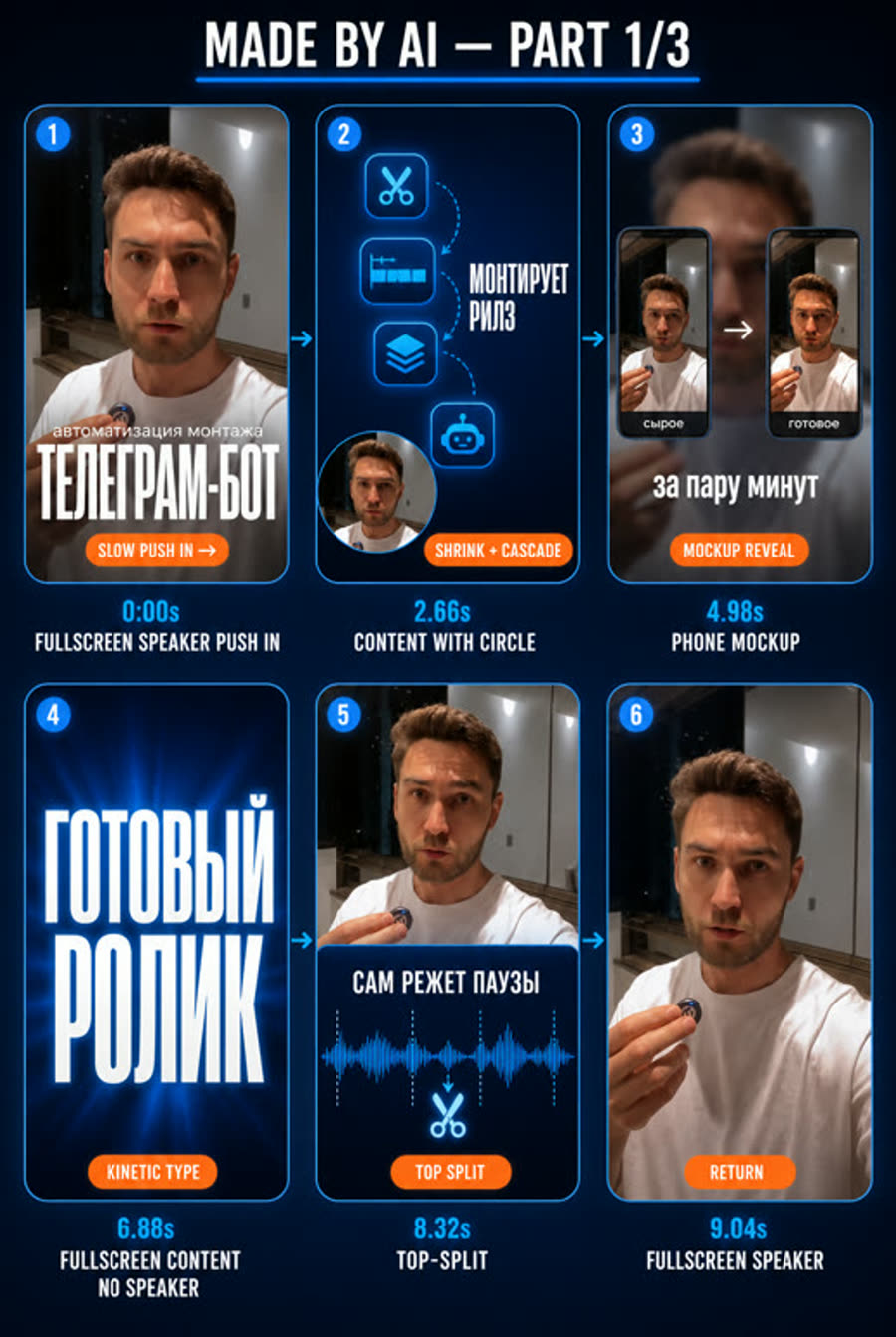
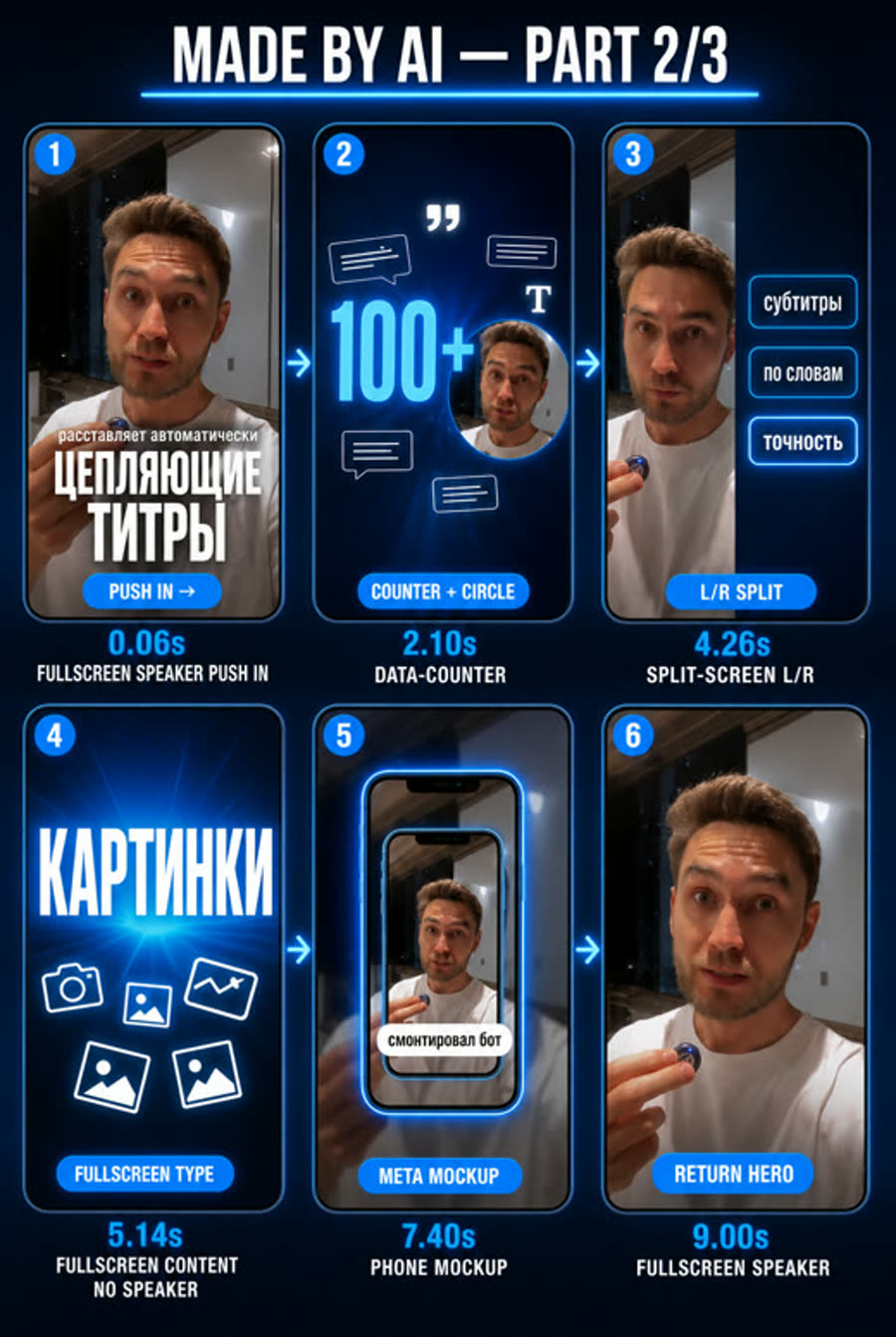
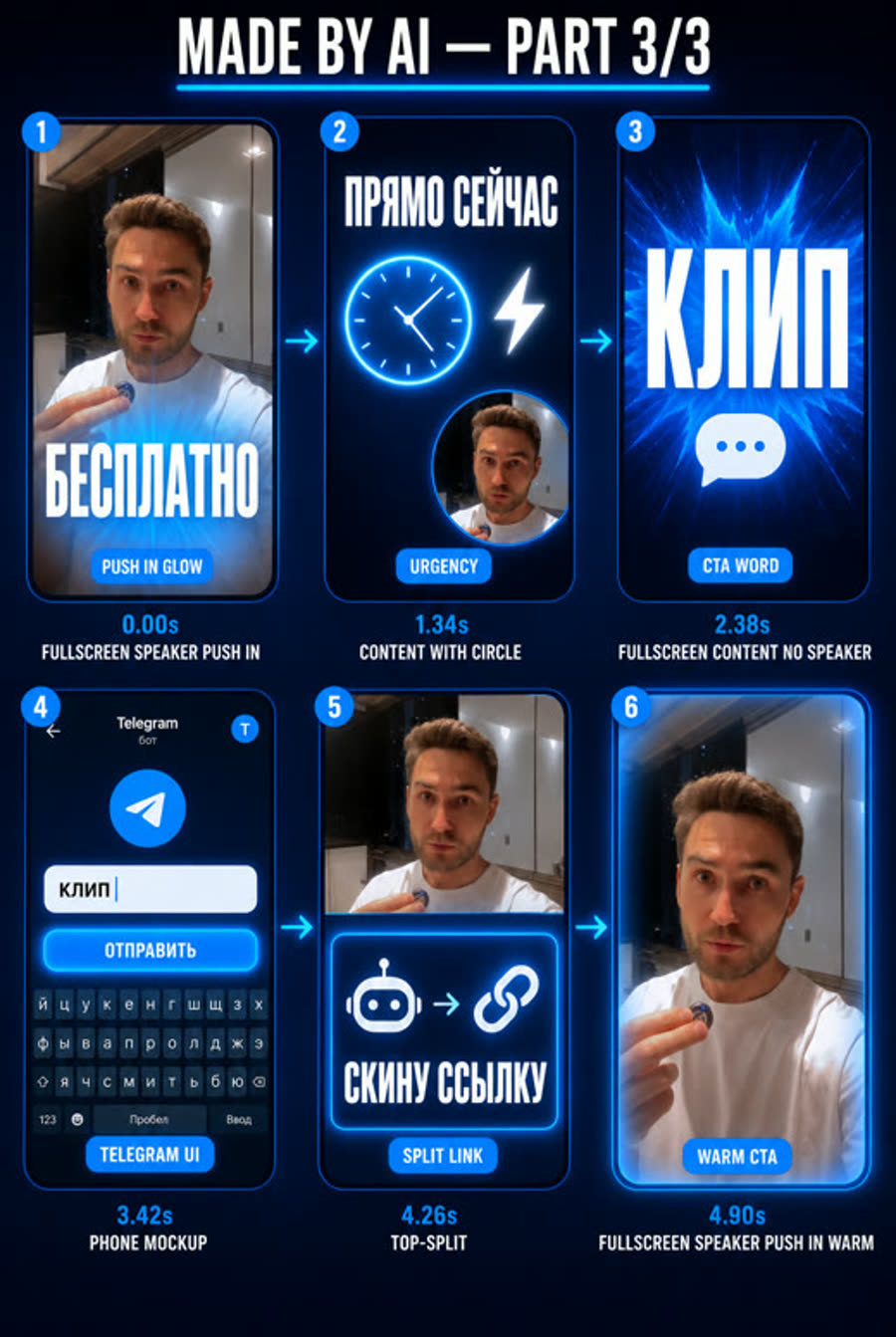
Шесть панелей на часть ролика, внутри — реальные кадры спикера, графика нарисована поверх. Эти борды вы утверждаете до платной генерации. Шапка «MADE BY AI» и подписи под панелями — из ранней версии движка: сейчас их не рисуют, потому что Omni переносил служебный текст прямо в видео.
01Как выглядит
- Вы в кадре, а мир вокруг перестраивается: наезды, вы ужимаетесь в верхнюю половину или в кружок, полноэкранные титры на кульминации.
- Счётчики цифр, мокапы телефона и терминала, сплит-экраны. Смена панели каждые 1,5–2 секунды.
- По желанию Omni меняет фон за вами и одежду, сохраняя лицо.
- Стиль задаётся формулой из библиотеки
/стили: один исходник даёт сколько угодно стилей.
02Когда брать
- ✓есть разговорная съёмка, хочется насыщенного AI-монтажа
- ✓нужна смена фона или серия одного ролика в разных стилях
- →нужна точная графика с настоящими цифрами →
/reels-brolls-remotion - →лица нет →
/reels-expert-audio - →снимать нечего →
/reels-omni-avatar
Что нужно на входе: Ваше разговорное видео ~30 секунд (бот или папка), стиль из /стили, решение про фон.
03Как запустить
Напишите агенту обычными словами или наберите команду. Например:
Или коротко: /reels-omni-myvideo — агент сам задаст недостающие вопросы.
04Что происходит по шагам
- 1
Свои материалы
делаете выПервым делом агент просит фото, скриншоты и видео для вставки. Это обязательный шаг перед любым автомонтажом.
- 2
Нарезка по фразам
делает агентРасшифровка и нарезка на части по ~10 секунд по границам фраз.
- 3
Раскадровка и стиль
вместеАгент пишет 6 панелей на часть; вы выбираете стиль и решаете про фон.
- 4
Сториборды
делает агентБорды в ChatGPT на ваших реальных кадрах. Агент проверяет орфографию и раскладку.
- 5
Утверждение бордов
делаете выБорды приходят альбомом в бот. «ок» или «перегенерь вторую». Перерисовать борд — бесплатно, перегенерировать джобу — нет.
- 6
Цена и запуск
делаете выАгент показывает цену в кредитах и рублях, ждёт «да». Сначала одна часть.
- 7
Сверка и сборка
делает агентЗвук сверяется с оригиналом, задвоения вырезаются. Сборка, бейдж поверх вотермарка, приёмка.
05Заложенные промпты
Эти тексты агент собирает и подставляет сам. Они здесь, чтобы вы понимали, что именно уходит в нейросеть, и могли поправить под себя.
Create ONE vertical 9:16 storyboard sheet, 1080x1920, a grid of SIX phone-shaped panels in two columns and three rows. No title, no header, no watermark and no caption anywhere on the image: the six panels start right at the top edge.

Each panel contains the corresponding ATTACHED frame of the speaker as its base photo (attachment one goes into panel one, attachment two into panel two, and so on), with motion graphics drawn ON TOP of that frame. Keep the man exactly as he looks in the attachments: same face, hair, beard, clothes and pose. Do not redraw him, do not replace him with another person, do not beautify him.

VISUAL STYLE for all overlay graphics — <style из спеки>

HARD RULE ON TEXT, valid for every panel: text must be SPARSE and SINGLE. One caption per panel, standing on its own. A small label is fine when it is alone — a single chip, a single line under a graphic, a single word inside a card. What is forbidden is MANY small pieces of text at once: no lists of rows, no logs, no tables, no columns of numbers, no code, no diffs, no file trees, no ticker rows, no chat threads. Dense text is redrawn into gibberish, rows get duplicated and digits rewritten. If a panel needs to show a set of things, show ONE of them large, or replace the set with a diagram of plain shapes and one caption.

Do NOT write any label, timing or shot-type caption under or over the panels: no English service words such as FULLSCREEN CONTENT or NO SPEAKER anywhere on the sheet. Omni redraws such labels straight into the finished video, and they have been caught in frame. Thin arrows point from one panel to the next in reading order. This sheet is part <N> of <M> of the same video, so keep the visual language identical to the other parts.

PANEL ONE. Shot type <shot>. Timing <timing>. <desc>
...
PANEL SIX. ...

All Russian text must be spelled correctly and be fully legible. Keep captions short.Edit this video following the attached storyboard exactly. Smooth fluid transitions, no hard cuts. Something is always moving; the first second is already in motion.
At <тайминг словами>, <движение по типу шота>. <первое предложение описания панели>
... (по строке на каждую панель)
Output ONE full-screen shot at every moment, filling the whole frame: NEVER a grid or mosaic of small panels, never arrows between panels, never storyboard panels, numbers or labels. Keep text sparse: ONE caption at a time, standing alone. A single small label is fine; many small pieces of text together are not. No lists of rows, no logs, no tables, no columns of numbers, no code, no file trees, no ticker rows, no chat threads. If a set of items must be shown, show one of them large or use plain shapes with one caption. Only one headline on screen at a time: the previous caption is COMPLETELY gone before the next appears, never two captions stacked on top of each other. Keep my original audio exactly as it is.FULLSCREEN SPEAKER PUSH IN the speaker fills the frame and the camera pushes in slowly
FULLSCREEN SPEAKER PUSH IN WARM the speaker fills the frame, camera drifting gently on a warm calm grade
FULLSCREEN SPEAKER the speaker returns full frame, talking straight to camera
FULLSCREEN CONTENT NO SPEAKER the speaker dissolves away and the graphic builds itself up
CONTENT WITH CIRCLE the speaker shrinks into a small circle in the corner while the graphic sweeps in
TOP-SPLIT the speaker shrinks into the top half while the card builds itself in the bottom half
SPLIT-SCREEN L/R the frame splits vertically, the speaker holding one side while the other side slides in
TERMINAL INSERT a terminal window wipes across the frame and its lines print themselves one by one
DATA-COUNTER the numbers roll up digit by digit and settle with a small overshoot
PHONE MOCKUP a phone rises into frame and its content pops in with overshoot
MATCH-CUT the motion of the speaker carries straight into the graphic without a cut
QUOTE-CARD the card drifts in and its text settles with overshoot
ZOOM-OUT REVEAL the camera pulls back and the whole picture reveals itself
LOWER KINETIC TITLE the headline snaps into the dark lower field with an overshoot
SPEAKER SHRINK TO TILE the speaker shrinks into a rounded tile up top while the graphic builds belowOutput ONE full-screen composition always: never show storyboard panels, numbers, grids or labels.
Only ONE headline on screen at a time: it fully disappears before the next appears, never overlapping.Keep the man EXACTLY as in his attached photo: exact face, hair, beard, skin, t-shirt, body and pose, identical to the attachment. Do NOT redraw / restyle / replace him with another person, do NOT beautify. The ONLY thing that changes is what is BEHIND him: cut him out from his room and place him in front of <НОВЫЙ ФОН>. Keep his cut-out edges natural. He stays a real photograph; only the background is new.06Шаблоны файлов
{
  "slug": "moy-rolik",
  "srcVideo": "workspace/reels/moy-rolik/src.mp4",
  "outDir": "workspace/reels/moy-rolik/storyboard",
  "framesDir": "workspace/reels/moy-rolik/frames",
  "styleName": "кинетик",
  "style": "pure jet black background, bright orange accents, bold condensed sans, kinetic typography with overshoot",
  "subject": "Keep the woman exactly as she looks in the attachments: same face, hair, clothes and pose. Do not redraw her.",
  "noSmallText": "Keep text sparse: one caption at a time.",
  "parts": [
    {
      "n": 1,
      "panels": [
        { "at": 0.5, "shot": "FULLSCREEN SPEAKER PUSH IN", "timing": "the very first second",
          "desc": "Speaker close-up, big white headline «ЗАГОЛОВОК» pops in with overshoot." },
        { "at": 2.1, "shot": "TOP-SPLIT", "timing": "right after the hook",
          "desc": "Speaker in the top half, bottom dark card with one orange pill «одна подпись»." }
      ],
      "attach": ["workspace/reels/moy-rolik/assets/screenshot.png"]
    }
  ]
}Часть 1 из 3, гамма: кинетик. Раскадровка (6 панелей):
0:00 FULLSCREEN SPEAKER PUSH IN — «первые слова хука» (хук)
1.36s TOP-SPLIT — «слова из расшифровки» (боль)
3.16s FULLSCREEN CONTENT NO SPEAKER — «главная фраза» (кульминация)
5.02s CONTENT WITH CIRCLE — «пример» (доказательство)
6.80s DATA-COUNTER — «цифра» (результат)
8.40s FULLSCREEN SPEAKER PUSH IN WARM — «напиши СЛОВО» (призыв)
Таймкоды здесь только для нарезки кадров. В промпт для Omni время идёт словами.07Команды движков
Обычно их запускает агент. Пригодятся, если хотите повторить шаг сами или понять, что он делает.
node scripts/reel-inbox.mjs                       # видео из бота → workspace/reels/_inbox/

ffmpeg -ss A -to B -i src.mp4 -c:v libx264 -c:a aac parts/vc1.mp4   # нарезка по границам фраз

node scripts/reels/storyboard-batch.mjs workspace/reels/<slug>/sb-spec.json          # борды
node scripts/send-album-to-bot.mjs "Борды, смотри панели 3 и 5" workspace/reels/<slug>/storyboard/p1-board.png
node scripts/reels/storyboard-batch.mjs workspace/reels/<slug>/sb-spec.json --only 2 # перерисовать одну

node scripts/flow/omni-prompt.mjs workspace/reels/<slug>/sb-spec.json                # промпт монтажа
node scripts/flow/flow-prep-uploads.mjs workspace/reels/<slug>/parts vc              # копии со звуком

node scripts/flow/flow-omni-ingjob.mjs <p1-board.png> <vc1-snd.mp4> <p1-omni.txt> <omni/vc1.mp4> --port 9223

python scripts/flow/omni-find-repeats.py omni/vc1.mp4 --vs parts/vc1.mp4             # сверка звука
node scripts/flow/omni-cut-repeats.mjs omni/vc1.mp4 omni/vc1-fix.mp4 2.10-2.65        # вырезать задвоение

node scripts/flow/omni-assemble.mjs workspace/reels/<slug>/omni workspace/reels/<slug>/parts vc workspace/reels/<slug>/final.mp4