Аватар + тяжёлый Omni-монтаж
Два прохода во Flow: сначала чистый говорящий аватар, потом Omni перемонтирует его по сториборду в кинетический рилс.
- деньги
- платно
- выход
- Три части по ~10 секунд, склейка ~30 секунд, 1080×1920.
- время
- джоба Omni около получаса на часть
 пример
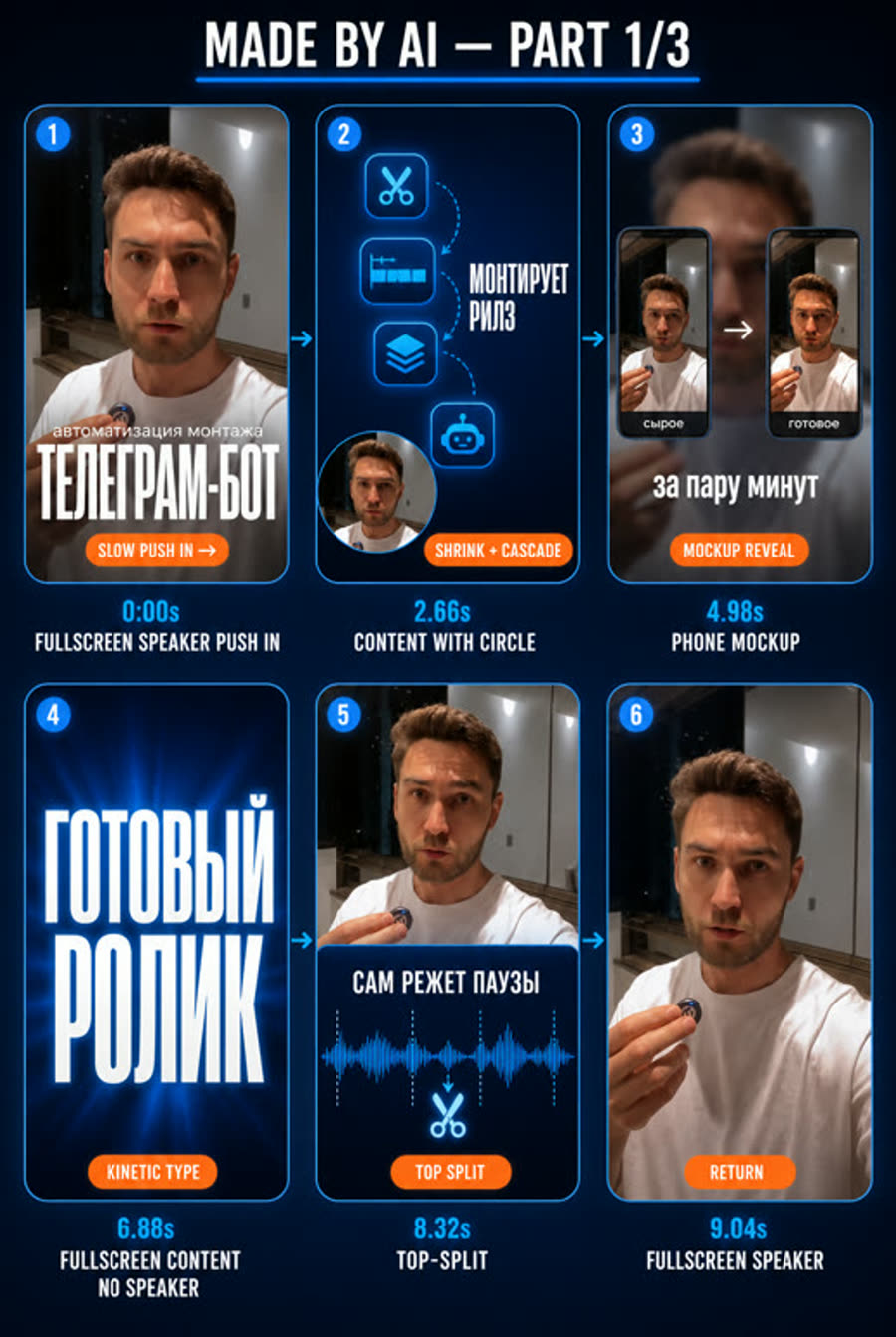
что на видеоТак выглядит сториборд, по которому Omni печёт монтаж (пример из пака).
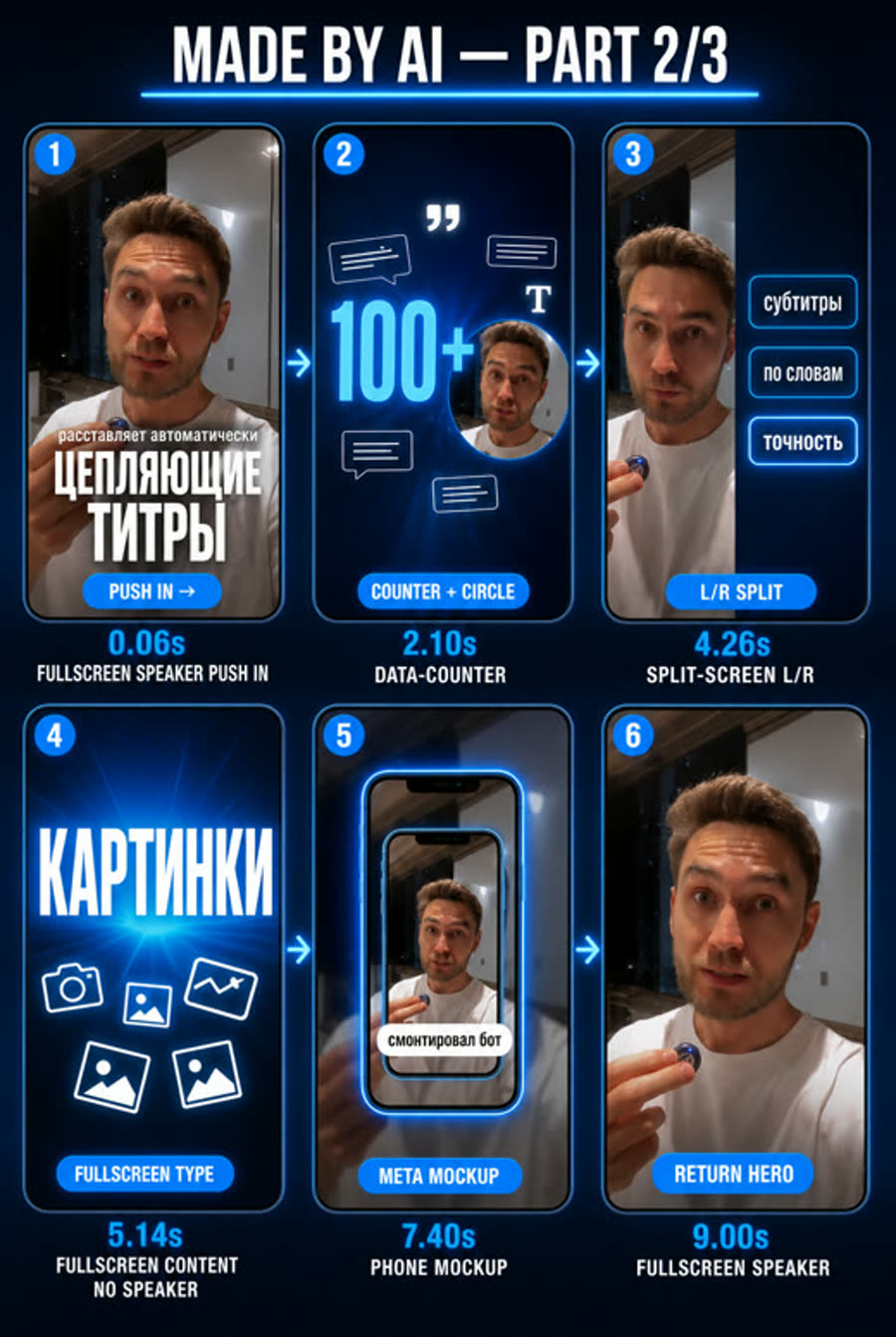
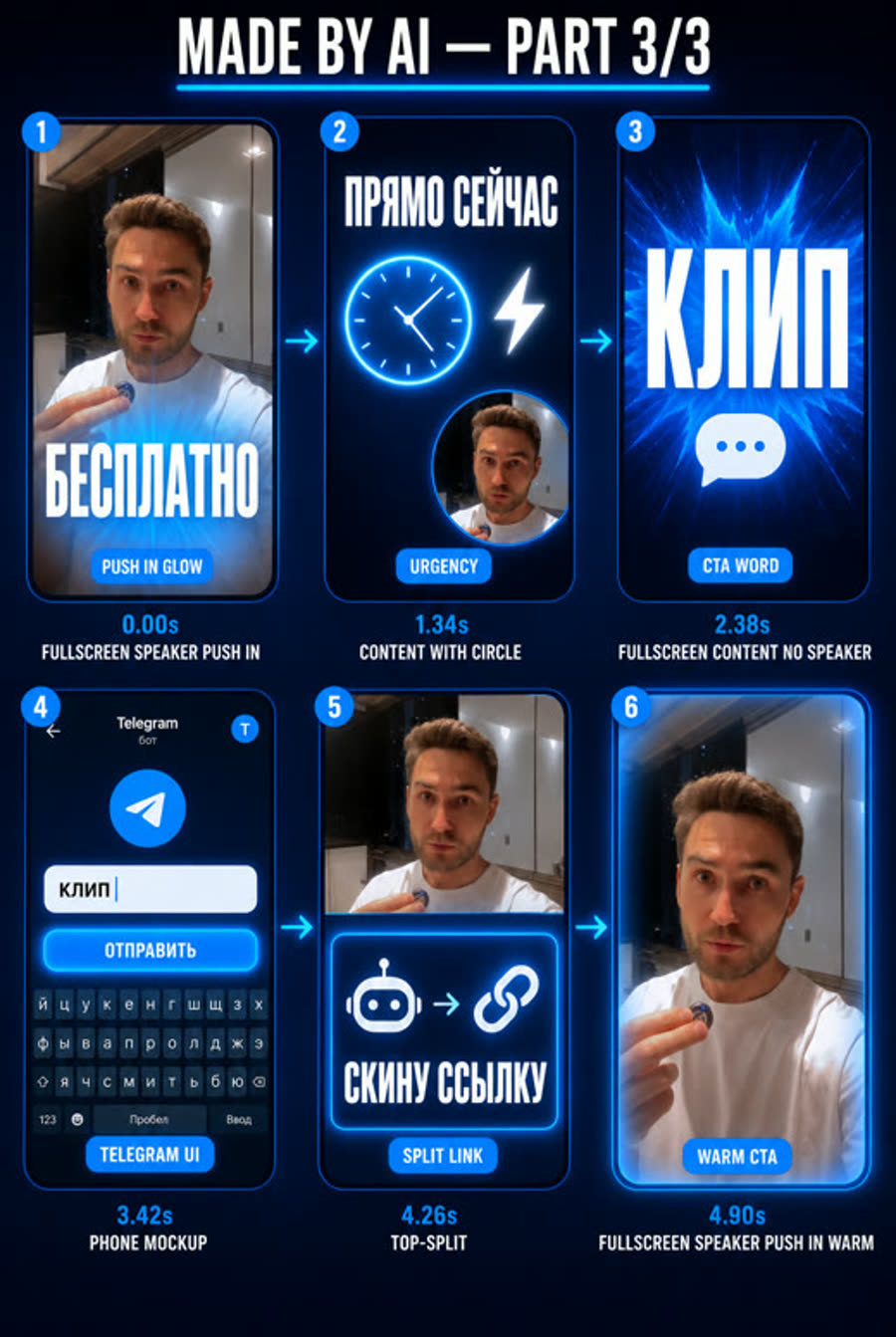
Шесть панелей на часть ролика, внутри — реальные кадры спикера, графика нарисована поверх. Эти борды вы утверждаете до платной генерации. Шапка «MADE BY AI» и подписи под панелями — из ранней версии движка: сейчас их не рисуют, потому что Omni переносил служебный текст прямо в видео.
01Как выглядит
- База — живой аватар: смена ракурсов, медленный наезд, жесты, тёплый свет, без текста.
- Поверх Omni печёт кинетику по борду: спикер ужимается в кружок или в верхнюю половину, полноэкранные титры, счётчики, мокапы телефона.
- Эталонный стиль: чёрный фон, ярко-оранжевые акценты, узкий жирный гротеск с перелётом.
02Когда брать
- ✓лицо нужно, снимать нечего, и хочется насыщенного монтажа
- →нужна предсказуемость и дешевизна →
/reels-omni-avatar - →есть своё видео →
/reels-omni-myvideo
Что нужно на входе: Три реплики в manifest.json, ваш аватар во Flow, свои материалы для врезок.
03Как запустить
Напишите агенту обычными словами или наберите команду. Например:
Или коротко: /reels-aiavatar — агент сам задаст недостающие вопросы.
04Что происходит по шагам
- 1
manifest.json
делаете выРеплики, одежда, обстановка, кодовое слово. Вы утверждаете.
- 2
Проход 1 — аватар
вместеСначала пробный запуск без отправки, затем генерация (платно).
- 3
Кадры и сториборд
делаете выПо 6 реальных кадров на часть → борд в ChatGPT → вы утверждаете борды.
- 4
Проход 2 — Omni-бейк
делает агентБорд и клип прикрепляются ингредиентами (сначала борд). Отправка только при двух прикреплённых файлах.
- 5
Склейка
делает агентЧасти в 1080×1920, родной звук, бейдж. Приёмка.
05Заложенные промпты
Эти тексты агент собирает и подставляет сам. Они здесь, чтобы вы понимали, что именно уходит в нейросеть, и могли поправить под себя.
Create a dynamic vertical 9:16 talking clip using my avatar. The man is wearing ${WARDROBE}, ${SETTING}. He looks straight at the camera and speaks energetically and confidently in RUSSIAN with a deep natural MALE voice, perfectly lip-synced and continuous from the very first frame, no intro pause: «${LINE}» Keep it lively — a couple of subtle angle changes between a front close-up and a 3/4 side, plus a slow gentle push-in, natural hand gestures. Warm cinematic afternoon light, shallow depth of field, the Eiffel Tower and passers-by softly out of focus behind him. Do NOT add any on-screen text, captions, subtitles or graphic overlays. Keep his voice running the whole time.Create ONE vertical 9:16 storyboard sheet, 1080x1920, a grid of SIX phone-shaped panels in two columns and three rows. No title, no header, no watermark and no caption anywhere on the image: the six panels start right at the top edge.
Each panel contains the corresponding ATTACHED frame of the speaker as its base photo (attachment one goes into panel one, attachment two into panel two, and so on), with motion graphics drawn ON TOP of that frame. Keep the man exactly as he looks in the attachments: same face, hair, beard, clothes and pose. Do not redraw him, do not replace him with another person, do not beautify him.
VISUAL STYLE for all overlay graphics — <style из спеки>
HARD RULE ON TEXT, valid for every panel: text must be SPARSE and SINGLE. One caption per panel, standing on its own. A small label is fine when it is alone — a single chip, a single line under a graphic, a single word inside a card. What is forbidden is MANY small pieces of text at once: no lists of rows, no logs, no tables, no columns of numbers, no code, no diffs, no file trees, no ticker rows, no chat threads. Dense text is redrawn into gibberish, rows get duplicated and digits rewritten. If a panel needs to show a set of things, show ONE of them large, or replace the set with a diagram of plain shapes and one caption.
Do NOT write any label, timing or shot-type caption under or over the panels: no English service words such as FULLSCREEN CONTENT or NO SPEAKER anywhere on the sheet. Omni redraws such labels straight into the finished video, and they have been caught in frame. Thin arrows point from one panel to the next in reading order. This sheet is part <N> of <M> of the same video, so keep the visual language identical to the other parts.
PANEL ONE. Shot type <shot>. Timing <timing>. <desc>
...
PANEL SIX. ...
All Russian text must be spelled correctly and be fully legible. Keep captions short.Edit this video following the attached storyboard exactly. Smooth fluid transitions, no hard cuts. Something is always moving; the first second is already in motion.
At <тайминг словами>, <движение по типу шота>. <первое предложение описания панели>
... (по строке на каждую панель)
Output ONE full-screen shot at every moment, filling the whole frame: NEVER a grid or mosaic of small panels, never arrows between panels, never storyboard panels, numbers or labels. Keep text sparse: ONE caption at a time, standing alone. A single small label is fine; many small pieces of text together are not. No lists of rows, no logs, no tables, no columns of numbers, no code, no file trees, no ticker rows, no chat threads. If a set of items must be shown, show one of them large or use plain shapes with one caption. Only one headline on screen at a time: the previous caption is COMPLETELY gone before the next appears, never two captions stacked on top of each other. Keep my original audio exactly as it is.06Шаблоны файлов
{
  "slug": "moy-avatar-rolik",
  "flowPort": "9223",
  "cta": "РАЗБОР",
  "avatar": {
    "mention": "@me",
    "wardrobe": "a light linen shirt",
    "setting": "sitting at a bright studio desk with an open laptop"
  },
  "segments": [
    { "id": "S1", "line": "Хук или боль одной фразой. Без тире.", "broll": "a phone screen with notifications" },
    { "id": "S2", "line": "Суть: что именно делать и почему это работает.", "broll": "hands typing on a laptop" },
    { "id": "S3", "line": "Выгода и призыв. Напиши слово РАЗБОР в комментариях.", "broll": "a glowing checklist" }
  ]
}07Команды движков
Обычно их запускает агент. Пригодятся, если хотите повторить шаг сами или понять, что он делает.
# проход 1 — аватар (DRY=1 проверяет прикрепление аватара без отправки)
FLOW_PORT=9223 DRY=1 node ~/.claude/skills/reels-aiavatar/engine/flow_avatar.mjs workspace/reels/<slug>/manifest.json S1
FLOW_PORT=9223       node ~/.claude/skills/reels-aiavatar/engine/flow_avatar.mjs workspace/reels/<slug>/manifest.json S1
FLOW_PORT=9223 node ~/.claude/skills/reels-aiavatar/engine/flow_grab.mjs workspace/reels/<slug>/flow-raw "S3,S2,S1"

# 6 реальных кадров на сегмент → сториборд в ChatGPT
ffmpeg -ss 0.5 -i workspace/reels/<slug>/flow-raw/S1-raw.mp4 -frames:v 1 workspace/reels/<slug>/storyboard/s1-f1.jpg
node scripts/reels/storyboard-image.mjs workspace/reels/<slug>/storyboard/s1-prompt.txt \
  workspace/reels/<slug>/storyboard/s1-board.png s1-f1.jpg s1-f2.jpg s1-f3.jpg s1-f4.jpg s1-f5.jpg s1-f6.jpg

# проход 2 — Omni печёт монтаж по борду (сначала борд, потом видео)
FLOW_PORT=9223 DRY=1 node ~/.claude/skills/reels-aiavatar/engine/flow_montage.mjs <S1-raw.mp4> <s1-board.png> <s1-omni.txt>
FLOW_PORT=9223       node ~/.claude/skills/reels-aiavatar/engine/flow_montage.mjs <S1-raw.mp4> <s1-board.png> <s1-omni.txt>